Saturday, 23 October 2010

Build Your Own Drum Controller With Drum Kit Kit AI

Build Your Own Drum Controller With Drum Kit Kit AI: "


Drum Kit Kit AI is a drum machine brain for building a DIY drum controller.


It features an on-board Ardunio, MIDI out, and an FTDI connection out to your computer. For those of you who don’t know what an FTDI connection is, just think of it as a connection for a ‘Special USB Cable’ that connects the device to your Mac/Windows PC/Linux computer in the same way you would connect a printer.


Click here to view the embedded video.


Here’s a demo of a DIY drum controller built around the Drum Kit Kit AI:


Click here to view the embedded video.


Features:


  • On board ATmega (frees up your Arduino for other projects).

  • Screw terminals for the drum pad connections (makes changing pads easier).

  • On-board Din-5 MIDI-out jack (Use the DKKAI, with your other MIDI equipment).

  • FTDI compatible 90° pin header (makes it easy to program or use our Serial to MIDI software on your computer).

  • DC 2.1mm power jack (power the Drum kit while “one the road”).

  • All the ATmega digital pins are brought out in two rows of connectors with standard 0.1” spacing. With, +5 volts and ground (make your own accessories, selector buttons etc …).

  • Four corner mounting holes (Build the Drum Kit into a project box and mount it).

  • On board voltage regulator.

  • Power selector jumper for USB (via optional FTDI cable) or DC power jack.


"

Thursday, 21 October 2010

OTO Biscuit Update: Lovely Boutique 8-bit + Analog Effect Gets New Features

OTO Biscuit Update: Lovely Boutique 8-bit + Analog Effect Gets New Features: "


I covered the OTO Machines Biscuit early this year, in particular noting the design process of creating new hardware. Hardware today is back with a vengeance, but with the flexibility of software: the gear is contained in a single object and interface, but can be upgraded just as computer code on a desktop can. Sure enough, OTO are back this week with a series of updates, which are easier to watch and hear than to talk about. See the video above for four new effects and various other improvements, available as a free firmware update and delivered (oh, the retro glory) via SysEx.


It’s quite a success, too, for a boutique offering. 300 units have already sold, say OTO: “200 more will be available in November, with 150 already sold from this next batch.”


It’s love in a digital age.


Previously:

OTO Machines BISCUIT: 8-bit + Analog Filter Effect; Designing New Hardware


Official site:

http://www.otomachines.com

"

Wednesday, 20 October 2010

GuitarJack – Get Audio In and Out of Your iPhone

GuitarJack – Get Audio In and Out of Your iPhone: "

iPhone apps and devices are a huge industry – everyone who knows Objective-Ooriented C are filling the market with various apps for your iPhone or iPod touch. The music industry is no different with quite a few different music applications entering the market every once in a while. I had the pleasure of fooling around with Sonoma WireWorks’ GuitarJack the other day.


GuitarJack is a great little device that plugs into your iPhone or iPod touch. It allows you to plug in your guitar or a microphone and record directly to your phone or pod. It currently works with iPhone 3G, 3GS and the second or third generation iPod Touches. Due to a difference in connectors on the iPhone 4, 4th generation iPod touch or iPad the GuitarJack doesn’t work with those models. But for all of you that haven’t seen the need to update to your newest iWhatever, the GuitarJack and its companion app FourTrack might come in handy.


Some Outside Specs


  • Sturdy – The GuitarJack is a sturdy little device, with aluminum housing so I’m sure it doesn’t break easily. It’s definitely built to last and since the device is great to use as a traveling recorder the sturdiness relieves the worry of your device malfunctioning.


  • Two inputs – The GuitarJack has two inputs, a 1/4 inch plug for connecting your guitar as well as a stereo 1/8 inch input.

  • Headphone Jack – In order to hear what you are doing, the GuitarJack comes with a headphone output.


  • The GuitarJack doesn’t come with any apps, but it does work with a plethora of sound recording apps. I used their own FourTrack recording app to demo the unit and I was pleasantly surprised with the sounds I could get out of it.


    The Taylor EQ app comes bundled with the FourTrack but it can also be downloaded for free to use with the GuitarJack. On their website they list a few 3rd party applications that they know for sure work with the GuitarJack, so I’m sure there are many others that can be downloaded and used instead.


    FourTrack


    After downloading the FourTrack app I was good to go. Everybody in software land played well together and my guitar was instantly recognized by the FourTrack app. There is a special input monitoring section on the FourTrack where I could set my initial levels and select between the two inputs I could control. I was pretty impressed by being able to switch from Lo-Z to High-Z as well as being given the option of putting a pad on the signal.


    It’s obvious that the people at Sonoma WireWorks have thought about all the various situations this thing might be used and accommodated for all of them. The ¼ inch input has a Lo-Z pad which can come in handy if you want to send a stereo drum signal from your computer. Everybody who has ever had to plug a Dj into a DI box knows that it’s good to push those Pad knobs in before he blows out the speakers.


    All in all it was really convenient to be able to set initial levels into the GuitarJack before doing any recordings, and the addition of variable impedance switches was just an extra bonus.


    Sound Quality


    I was pleasantly surprised by the sound quality of the GuitarJack. I know the sound of my guitar through various pre-amps, PAs and the such so I was very pleased by the persuasive sound quality that came through my headphones. After getting a good signal without distorting the inputs I was happily strumming my guitar.


    The FourTrack comes with the built-in Taylor EQ that that they developed with Taylor Guitars. The Taylor EQ is a free app that includes the GuitarJack control panel so if you don’t feel the need to shell out an extra $9.99 for the FourTrack the Taylor EQ is a great alternative. I actually had a lot of fun playing with the Taylor EQ since they have different acoustic guitar presets that gave my acoustic guitar a few different makeovers. With six different guitar sounds and a built-in parametric EQ you can tweak your guitar tone to your heart’s desire.


    Extra Features


    The FourTrack had quite a few extra features that made me realize how much attention to detail the engineers at Sonoma had given this little device. It comes equipped with a metronome that even has a few standard rock beats if you hate the sound of a click track (I do), which comes quite in handy when you are recording your ideas into it. Even just the tiny panning controls on the FourTrack’s recording interface came in handy to give my small noodlings some definition and clarity. All in all, it’s a very intuitive interface that comes with many more features than you would expect.


    Have a listen to my guitar fiddling here which I exported directly from the iPhone. I had to bounce this from Logic to get it to MP3, and I made the same pan adjustments in Logic since the GuitarJack allows me to export each individual file instead of a master mix.


    Obviously, nothing is going to make an acoustic guitar sound like an acoustic guitar except miking it up directly with a nice microphone, but the GuitarJack does a pretty good job of translating my acoustic pick-ups.


    Download audio file (demo.mp3)


    Summing it up


    It’s a great sounding little device and it’s built to last. The sound quality is much better than if you were to plug your guitar directly into your phone, since the engineering of the device is built around maximizing sound quality as well as being able to communicate efficiently with the software you are using.


    For iPhone and iPod users that are in need of a great little pocket recorder to record their ideas on the fly, I would definitely recommend the GuitarJack along with their FourTrack software. You can take your guitar anywhere and record your inspirations on the spot without having to drag a laptop or a microphone with you.


    Pros

    • Great Sound Quality

    • Multiple inputs

    • Compatible with 3rd party programs


    Cons

    • Expensive

    • Doesn’t come with any apps


    For more information you can check out Sonoma WireWorks’ website. And check out their promo video below:


    "

    R.I.P. Ari Up of the Slits

    R.I.P. Ari Up of the Slits: "

    Arianna Foster, aka Ari Up, frontwoman for pioneering English punk band the Slits, has passed away, according to the website of John Lydon, aka Johnny Rotten of the Sex Pistols and Public Image Ltd., who was also Up's stepfather. According to Lydon's site, Up died 'after a serious illness.' She was 48 years old.


    "

    Monday, 18 October 2010

    Benji B first show on BBC Radio 1

    Benji B first show on BBC Radio 1: "

    bbenjib231

    Last wednesday saw Benji B do his first radio show on BBC Radio 1.


    Playing some of the biggest tracks in his crate from the past few months and brand new material, you can catch Benji B on BBC Radio every Wednesday Night into Thursday Morning at 2am-4am.


    Listen back to the show for the next few days via Benji’s BBC Radio 1 Homepage now, and don’t forget to tune in this week.


    Zed Bias — Badungdeng (feat. Rodney P & Fallacy) (Benji B VIP) Dubplate

    Roska — Time Stamp Rinse

    Omar — Dancing Now (feat. Mr Fox) Dubplate

    Kode9 — You Don’t Wash !K7

    Wiley & MJ Cole — From The Drop Prolific

    Ill Blu — Dragon Pop Hyperdub

    Breach — Fatherless PTN

    Ramadanman — Stifle (Benji B VIP) Dubplate

    Ramadanman — Glut Hemlock

    Ramadanman — Work Them Swamp 81

    Mala — Eyez DMZ


    Skream — Fields Of Emotion Tempa

    Horsepower — Lithium Soular Deep Medi

    Magnetic Man — Ping Pong Columbia

    Koreless — Up Down Up Down White

    Zomby — Digital Flora Brainmath

    Jamie Woon — Night Air Candent Records

    Quest — Smooth Skin Deep Medi

    Karriem Riggins — 2U4U (extended instrumental) Unreleased

    Slum Village — 2 U4 U Barak


    J Dilla — Red Light Unreleased

    Soho/Pal Joey — Hot Music Kool Groove

    Dam-Funk — Kill Dat Mutha****** Dubplate

    Floating Points — People’s Potential Eglo

    Marco Passarani — Good Split (I Like It) Running Back

    Lone — Once In A While Werk

    Martyn — Left Hander Forthcoming 3024

    Braiden — The Alps Forthcoming Doldrums

    Girl Unit — Wut Forthcoming Night Slugs

    "

    TEEBS – ARDOUR Vinyl Contest

    TEEBS – ARDOUR Vinyl Contest: "

    Teebs-Contest1


    NORTH AMERICA: VINYL | CD


    UNITED KINGDOM / EUROPE: VINYL | CD


    JAPAN: CD


    TEEBS has generously produced (3) unique, hand painted Vinyl Sleeves for ANYONE that orders ARDOUR (Vinyl or CD) from us directly.


    The contest will run for one full month, and the winners will receive the hand painted artwork in addition to their purchase.


    ALL Vinyl copies of Teebs – Ardour are packaged with a download code for the DIGITAL (MP3) version of the entire album.


    "

    Sunday, 17 October 2010

    RockersNYC x Forfex Space Boots

    RockersNYC x Forfex Space Boots: "

    rockersnyc forfex space boots 1 RockersNYC x Forfex Space Boots


    Never conforming to the “norm” RockersNYC continues its intriguing range of designs for Fall/Winter as they pair up with Italian footwear brand Forfex on a new collaboration. Utilizing the brand’s Space Boot, RockerNYC develops two simple colorways, each taking on a special printed upper amongst a black base with white highlights. Each pair also comes equipped with its own drawstring show bag and fanzine. Look for these in select Forfex accounts, including SlamJam.


    © L. Ruano for Hypebeast, 2010. |
    Permalink |
    3 comments |
    Add to
    del.icio.us


    Post tags: , ,

    "

    Tuesday, 12 October 2010

    Man About Town 2010 Fall/Winter Issue feat. Pharrell Williams

    Man About Town 2010 Fall/Winter Issue feat. Pharrell Williams: "

    man about town 2010 fallwinter issue feat pharrell williams 0 Man About Town 2010 Fall/Winter Issue feat. Pharrell Williams


    Grammy Award-winning production whiz kid behind The Neptunes and N*E*R*D, the multitalented Pharrell Williams is the central subject of the latest instalment from Man About Town. The editorial piece provides an in-depth interview with man himself, discussing a broad range of topics. The interview is well researched and many background details are given, ensuring a thorough analysis is given that has not been offered in most of Pharrell’s previous interviews. The piece is complemented by some elegant photos, captured by Alasdair McLellan, with a description of the garments worn below each picture.


    See more at Man About Town 2010 Fall/Winter Issue feat. Pharrell Williams


    © AlexMilner for Hypebeast, 2010. |
    Permalink |
    No comment |
    Add to
    del.icio.us


    Post tags: , , ,

    "

    Numbers on Boiler Room Tonite:::::::

    Numbers on Boiler Room Tonite:::::::: "


    My Favorite people Numbers are talking over the infamous Boiler Room Tuesday madness this evening.

    Tune in from 9PM here

    & Tomorrow HCR is back on Air with Mamiko Motto from 9PM at www.hepcatradio.net/radio


    "

    Soul Jazz compile Riddim Box: Excursions in the UK funky underground

    Soul Jazz compile Riddim Box: Excursions in the UK funky underground: "


    London’s Soul Jazz Records have put together a new double-disc compilation entitled Riddim Box: Excursions In The UK Funky Underground.


    Due out on November 8, it’s essentially a “best of” funky, featuring established anthems such as Hard House Banton’s ‘Sirens’, NB Funky’s ‘Riddim Box’ (which gives the comp its name), Altered Natives’ ‘Rass Out’, D-Malice’s ‘Gabryelle (Refix)’ and ‘Pulse vs Flex’ by Lil Silva (pictured), alongside more recent mutations from DVA, MJ Cole and Grievous Angel and unexpected remixes from Radio Slave and Solid Groove (of Stereotyp and Sunship respectively).


    There will also be a vinyl edition of Riddim Box, details of which are forthcoming.


    Tracklist:

    CD1


    01. Altered Natives – Rass Out

    02. MJ Cole – Volcano Riddim

    03. NB Funky – Riddim Box

    04. Tubby T – Ready She Ready (Seiji Remix)

    05. Sunship Feat. Warrior Queen – Almighty Father (Solid Groove Underground Souljah Mix)

    06. Zumen Feat. Leafnuts and Aaron Phiri – Rolexx

    07. Hard House Banton – Sirens

    08. Ghosts On Tape – Predator Mode (Roska Remix)

    09. Donae’o – African Warrior (Instrumental)


    CD2

    01. Stereotyp Meets Al Haca – Blaze ‘N’ Cook (Radio Slavermix)

    02. Kode9 – Black Sun

    03. Lil Silva – Pulse vs. Flex

    04. LV Feat. Rubi Dan and Errol Bellot – Crossfire

    05. Omar and Zed Bias – Dancing (Instrumental)

    06. D-Malice – Gabryelle (Refix)

    07. Grievous Angel – Move Down Low (Dubplate Mix)

    08. DVA – Natty

    09. Shystie – Pull It (Ill Blu Remix Instrumental)

    10. Crazy Cousinz – Attract


    "

    Image-Line updates Deckadance to v1.72

    Image-Line updates Deckadance to v1.72: "
    Image-Line Deckadance

    Image-Line has released version 1.72 of Deckadance, a virtual DJ application for Windows and Mac.


    Changes since v1.70


    • Added support for Dj-Tech Pocket Dj.

    • Added support for Dj-Tech uSolo Fx.

    • Modified midi mapping for jogs in Hercules Dj Console MK2/MP3 models.

    • Tag reading support for flac, m4a, wma and ogg.

    • Auto crossfader buttons jumps to next song in automix mode.

    • Added auto-detection of midi controllers.

    • Added “Deck Transport Reverse” via keyboard shortcuts and/or midi learn:

      • DECK A->Transport Reverse: “ctrl+b”

      • DECK B->Transport Reverse: “ctrl+n”


    • Added “Key Lock” and “Key Tuning” commands to the midi learn list.

    • Added support for Hercules DJ Control MP3 E2.

    • Added support for Synq DMC-100.

    • Added support for iCON i-DJ.

    • Improved Setup page.

    • Improved Tooltips display.

    • Improved scrollbars look.

    • Fix VST routing in external mode.


    Deckadance Club Edition (with full functionality) is available to purchase for $179 USD, Deckadance House Edition (excludes the timecoded vinyl/CDJ transport control functions) is $99 USD. New Image-Line customers buy with 10% discount.


    More information: Deckadance


    Related posts


    "

    Vestax intros Pad-One, MIDI pad controller

    Vestax intros Pad-One, MIDI pad controller: "
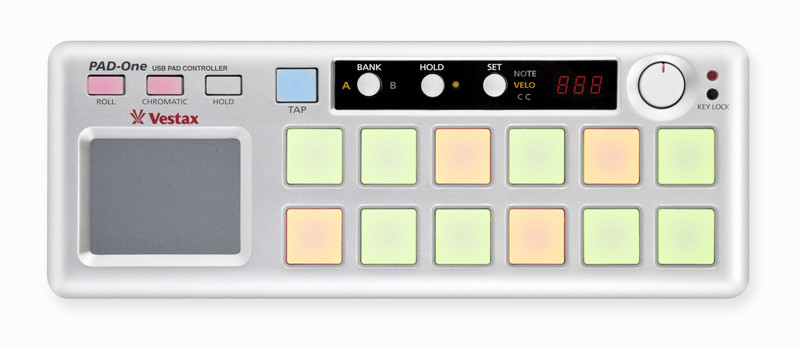
    Vestax Pad-One

    Vestax has announced the Pad-One, a portable MIDI pad controller.


    The Vestax PAD-One is a solid robust MIDI pad controller, compatible with various DJ & DAW software and can be used to control any kind of MIDI device, including synthesizers, samplers, drum machines, and electronic drums.


    The aluminum chassis will never warp or crack, ensuring you long life durability and stability. The PAD-One can individually assign pads on the fly, and shows you each pads MIDI value on the 7seg indicator. Compact, solid and reliable, the PAD One is the ideal item to your DJ arsenal.


    Pad-One features


    • 12 velocity & pressure sensitive LED backlit pads.

    • Individual LED color for each bank.

    • MIDI message for each pad can be selected with the PAD-One.

    • Real time control XY touch pad.

    • Solid aluminum die-casted robust chassis .

    • Full control of ROLL button tempo with the TAP button.

    • MIDI cable connection for control over various effect and sampler devices.

    • USB plug & play.

    • Excellent portability.


    More information: Vestax / Pad-One


    Related posts


    "

    Moog Slim Phatty Synthesizer – A Moog Synth For $799!

    Moog Slim Phatty Synthesizer – A Moog Synth For $799!: "


    The Moog Slim Phatty, just moved from rumor status to blurry-cam status, is a new rack-mountable version of the Moog Little Phatty synthesizer.


    It hasn’t officially been announced, but this photo has leaked out, via the AMS catalog, along with this short blurb:


    The Slim Phatty offers a 100% analog signal path, intuitive user interface, rugged construction with MIDI, USB and Control Voltage functionally.


    Expect to see:


    • two analog VCO’s

    • a 24 dB/Oct Moog ladder filter

    • VCA

    • Two ADSR envelope generators

    • 4-waveform LFO

    • MIDI In/Out

    • Gate, Pitch, Filter & Volume CV’s in

    • Ext. Audio in


    The Moog Slim Phatty is reportedly priced at $799. This is about $700 less than the Little Phatty keyboard, making it a pretty killer price for a real analog Moog synth!


    None of this info on the Moog Slim Phatty is official yet. We’ll let you know as soon as the official specs are announced.


    In the meantime, though, check it out and let us know – are you interested in a Moog synth for $799?


    via MuffWiggler’s


    "

    Monday, 11 October 2010

    Fraser Moss: Collector’s Spillover

    Fraser Moss: Collector’s Spillover: "

    fraser moss collectors spillover 1 Fraser Moss: Collectors Spillover


    Collecting is a prevalent hobby in our culture as sometimes weird and quirky items become our affection. Sneakers, clothing, vinyl, toys, cameras, candy bars, regional McDonald’s pies, their innocent nature can sometimes involve a more meaningful existence. Whether subconsciously or through deliberate efforts, the sounds of that vintage vinyl or the construction of that generations-old piece of furniture are not to be overlooked. For YMC’s Fraser Moss, comic books, vintage fashion, vinyl and other general oddball items have all captured his attention over the years. We were interested to see his insights into the art of collecting and how his passions began. For many, it seems that collecting itself holds strong references to one’s childhood and arguably situates itself as one’s own personal way of keeping track of their important times in their lives.


    Interview: Eugene Kan

    Photography: Edward Chiu


    See more at Fraser Moss: Collector’s Spillover

    © Staff for Hypebeast, 2010. |
    Permalink |
    No comment |
    Add to
    del.icio.us


    Post tags: , , , ,

    "

    Robot Koch – Songs for Trees and Cyborgs mini mix

    Robot Koch – Songs for Trees and Cyborgs mini mix: "


    I’m very happy to be able to bring you a guest mix from Robot Koch this week to celebrate the forthcoming release of his ‘Songs for Trees and Cyborgs’ album on Project Mooncircle. Not only did the man put together a short mini mix of the album and other tracks for your ears, we’ve also got a preview of a brand new video for the album track ‘Threats’ (see below).


    Anyone who’s followed the show closely will know we’ve got a lot of love for the German producer. His attention to detail and production skills have made him one of the finest producers amid the recent electronic hip hop scene, each of his releases builds on the previous one showcasing new ideas, styles and an incredible knack for melodies and rhythms. What’s more he’s been at it for longer than most, under a variety of guises including The Tape and one third of Jahcoozi. Oh and he’s got an incredible pair of ears too – all his productions sound crisp, especially compared to the rest of the producers out there.


    I’ve been wanting to get him on the show for a while, and thanks to Gordon at PMC we’ve got this mini mix for your ears. As I said the mix celebrates the release of ‘Songs for Trees and Cyborgs’ which was released on Project Mooncircle at the beginning of the month. You can also view the video for ‘Threats’ below, which was released yesterday.


    We’ve aired tracks from the album in recent shows, and I recommend you go and purchase it as it’s one of the better releases this year. His previous EPs for the label as well as the recent Jahcoozi album are also all recommended.


    For now though I’ll leave you in the hands of the man who never sleeps, Robot Koch. Many thanks to him and Gordon for the love.


    Download Robot Koch ‘Songs For Trees and Cyborgs’ mini mix (right click and save as)


    Download audio file (Rhythm_Incursions_-_Robot_Koch_minimix.mp3)
    "

    GOLD PANDA - Lucky Shiner

    GOLD PANDA - Lucky Shiner: "150

    GOLD PANDA
    Lucky Shiner
    Notown Records
    BEATS / DOWNTEMPO / BOOGIE
    LP

    The highly anticipated debut album from Gold Panda (discounting the Japan-only collection of singles!). Ever since his 'Miyamae' 12" dropped on Various Production's label last year, it was obvious Gold Panda was one to watch. Since then he's had a clutch of warmly received singles for Make Mine and Ghostly International besides a stream of remixes for everyone from Health to The Field, each painting a more detailed and involving portrait of a distinctly lovely artist with a penchant for sweetly exotic melodies and crafty electronic composition. His beautiful recent single 'You' aside, there are ten tracks of brand new material, ranging from the dusted sunrise techno figure of 'Vanilla Minus', through the trickling melodic cadence of 'Same Dream China', and the ecstatic throb of 'Snow & Taxis', maintaining a thread of tenderly blissed emotions which make 'Marriage' and the pastoral pulses of 'I'm With You But I'm Lonely' so unforgettably nice. fans of Lusine, The Field, CFCF, Four Tet or Caribou should book in some quality time with Gold Panda.
    "

    Friday, 8 October 2010

    Jam Your iPad Full of Chord Charts

    Jam Your iPad Full of Chord Charts: "

    Ever since I started playing music I’ve carried notebooks around with me to write lyrics and chords in. These days I’m just as likely to type then onto my laptop. I’ve finally got hold of my own iPad (now I don’t have to “borrow” my wife’s), and thought that it’s a great size both for both carrying and reading chord charts. So my search for the perfect app began.


    This is our third look at the iPad. You can see the previous two articles here:


    We’ve already touched on the idea of using iPads for reading sheet music, and listed a few apps. But chord charts are a bit different to sheet music. They’re simpler. They give you just enough information so you don’t clash with the band, without telling you every note to play. And you’ll definitely prefer chord charts if you can’t read music. (Though I say it’s definitely a skill worth working on.)


    Not everyone collects chord charts – or sheet music. Some people prefer to play by ear, and become very talented at it. (By the way, watch out for a great Basix series on playing by ear coming real soon.) But as I searched the Net I came across story after story of grateful musicians. Musicians who have been lugging folders full of music around with them for years. Now they just carry their iPad.


    Sounds tempting! So my search for the perfect chord chart app began. Here are 8 apps that might do the job. They include two general apps that handle PDFs and other relevant file types, two iPad chord chart apps I’ve bought and am trying out, one other iPad app I haven’t tried yet, and three iPhone apps – they look interesting, and work on the iPad too.


    1. GoodReader


    $1.99 in the iTunes app store


    I quite like GoodReader. It can read a variety of file types, including types I have chord charts in – PDF and DOC. What I really love is the way that it displays everything in my Dropbox, and lets me view them from within the app. That makes things very easy to get all my chord charts onto the iPad.


    In a recent update, GoodReader now allows you to annotate, highlight and mark up PDFs, and save these within the file. That can be really handy when wanting to remember some particulars about how the song goes, or highlight where that tricky chord goes you keep forgetting.


    This is quite a good option. The app is flexible and cheap. It might suit many of you, though doesn’t have some of the features included in apps particularly focused on chord charts.


    2. Notebooks


    $8.99 in the iTunes app store


    This is one of the handiest and most flexible iPad apps I’ve found. It’s my iPad Swiss Army knife:


    • It can read a wide variety of file types, including PDF and most office suite files.
    • It connects to my computer like a wireless USB stick, allowing me to drag all sorts of files (including chord charts) right into the app.
    • It allows me to organise the files and notes in a hierarchical structure with endless depth – so I can categorise my chord charts to my heart’s content.
    • It lets you tag any file with a due date, which is a handy way of creating sets.

    I’ve been using the app for weeks, but only recently realized how useful it is for storing my chord charts. But again, it doesn’t have all the features of the apps that are designed specifically for handling chord charts.


    3. OnSong


    $4.99 in the iTunes app store


    This app looked interesting enough in the app store for me to buy. Here are some things I like about it:


    • You can import chord charts and tabs directly from Ultimate-Guitar.com – from within the app. That site has a ton of songs, which means I don’t have to start from scratch, and often have a choice of different people’s versions.
    • You can change the relative size of chords and lyrics, so I can make the chords really big and lyrics really small (or vice versa). I can also highlight chords.
    • I can transpose songs to any key by using a slider.
    • I can put post-it notes on my chord charts to help me remember key information.
    • I can organise the songs into sets, and change between songs by swiping.
    • There is a Play button at the top of the app, which I can configure to play either a metronome or MP3. This gives me something to play along with while practicing, and I can use it to play backing tracks while gigging.

    Overall it’s a fairly solid app.


    4. iChordChart


    $2.49 in the iTunes app store


    This one also looked interesting enough to buy. It looks and acts quite different to OnSong. The app has three modes that look quite different from one another:


    1. When you view a chord chart, around a third of the top section of the screen is taken up with database fields for the song’s title, artist, key, rating etc. The bottom two-thirds of the screen show the chart.
    2. When you are editing a chart section, the display turns to a grid for entering the chords and lyrics on alternating lines.
    3. When playing a set, almost the whole screen is given to displaying the chart. There is a handy “Low Light” button that sets the background color to dark gray, the lyrics to a lighter gray, and the chord symbols to blue. That way your iPad won’t act as an unwanted spotlight when in low light conditions on stage.

    Overall I enjoy the app, but find myself turning to OnSong more. iChordChart also lets you share chord charts with other band members, and people around the world. But its implementation doesn’t compare with being able to import from a huge existing base of songs on Ultimate-Guitar.com.


    5. iReal Book


    $9.99 in the iTunes app store


    iReal Book is the ultimate chord chart for Jazz musos. I don’t know how many Jazz fans read Audiotuts+ – give us a shout out in the comments if that’s you.


    iReal Book stores chords, but not lyrics. I love that it displays bar lines, and has a broader range of notation than the other apps. And iReal Book comes with a long list of 900 chord charts, including Jazz standards and pop songs.


    But where the app really stands out, is that it can accompany your playing with its own piano, bass and drums accompaniment. It comes with the Medium Swing Jazz style included, and at an extra cost you can purchase the Jazz Styles Pack, which includes another 10 styles. Even more styles should become available in the future.


    I can imagine a Jazz guitarist taking this app along to a gig – not just as a chord chart, but as the band!


    6. GigPal (iPhone)


    $1.99 in the iTunes app store


    This is a chord chart app for the iPhone that offers rapid entry of chords, as well as providing a metronome and playing the guitar chords you entered. It’s probably more of a practice tool than gigging tool, and looks very useful.


    Here is a video of it in action:


    7. MySongbook (iPhone)


    $1.99 in the iTunes app store


    This app looks a little similar to OnSong, but for the iPhone. It allows you to import songs from the Net, displays lyrics and chords, and allows you to transpose.


    8. Jam Genius (iPhone)


    $0.99 in the iTunes app store


    This is another iPhone app that displays chords with bar lines. When you tap the chord symbols, chord and scale diagrams pop up at the bottom of the screen.


    The app is designed with jamming in mind – instead of playing mindlessly, the band can all follow the same chord chart. It’s a more basic app than some of the others listed.


    Decision


    Which app appeals to you most? For me, it’s OnSong. It’s clear display, easy navigation, and huge library of charts to import won me over. But some of the other apps also look interesting, and I may end up buying most of those listed above.


    I haven’t covered all of the iPad apps that can do chord charts. Which do you use? Which do you recommend? Which aren’t worth bothering with? Let us know in the comments.


    "